
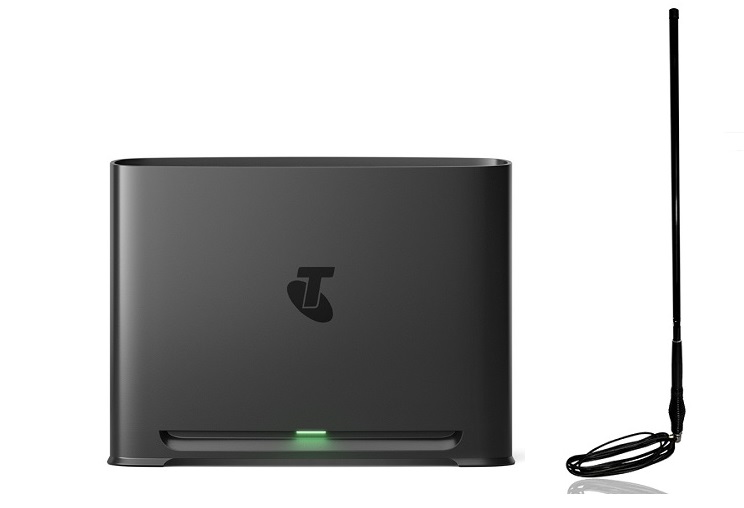
The Telstra Smart Modem 4 is a powerful device, bringing Wi-Fi 7 and robust connectivity to homes across Australia. With its 5G and 4G backup feature, it offers a reliable internet connection even when your primary NBN service is down. However, to truly unlock the full potential of this mobile backup, especially in areas with weaker signal, an external antenna is essential. This guide will walk you through everything you need to know about boosting your modem’s performance.
We will explore the modem’s key features, explain the crucial role of external antennas and show you where to find the best options. You’ll also find practical installation tips and a comprehensive FAQ section to answer all your questions.
Introduction to the Telstra Smart Modem 4
The Telstra Smart Modem 4 is a state-of-the-art, dual-band router designed for the modern, high-capacity smart home. It stands out with its next-generation Wi-Fi 7 technology, which delivers faster speeds, lower latency and superior performance in environments crowded with many connected devices.
One of its most valued features is the 5G/4G backup. Should your NBN connection ever fail, the modem automatically switches to Telstra’s extensive mobile network. This seamless transition ensures you stay online for work, streaming and communication without interruption. While 5G provides incredibly low latency, a strong 4G signal remains a dependable backup for a vast majority of users.
Key Features and Specifications
The Telstra Smart Modem 4 is engineered to handle the demands of a fully connected household. Its specifications are impressive and cater to a wide range of user needs.
- Wi-Fi 7 (802.11be): This latest Wi-Fi standard offers a significant leap in speed and efficiency, making it perfect for handling multiple high-bandwidth activities at once.
- High Capacity: The modem is designed to support over 250 connected devices simultaneously, from laptops and smartphones to smart home gadgets.
- Enhanced Coverage: It features EasyMesh technology. This allows it to work seamlessly with Telstra Smart Wi-Fi Boosters to create a unified network that eliminates dead zones and extends coverage throughout your home.
- Advanced Security: With WPA3 security protocols, your network is protected by the latest encryption standards, safeguarding your data from unauthorized access.
- SmartFix Feature: On eligible plans, the modem can automatically detect network faults and initiate troubleshooting steps to resolve them, minimizing downtime.
| Feature | Specification |
|---|---|
| Wi-Fi Standard | Wi-Fi 7 (802.11be) |
| Mobile Backup | 5G and 4G |
| Device Capacity | 250+ |
| Security | WPA3 |
| LAN Ports | 4 x Gigabit LAN |
The Role of External Antennas
While the Telstra Smart Modem 4 has capable internal antennas, its true potential for mobile backup is unlocked with external ones. These antennas are not for your primary NBN connection; their purpose is to dramatically improve the 4G and 5G signal reception for the backup service.
This is particularly vital in rural or fringe coverage areas where the mobile signal from the nearest tower might be weak or inconsistent. By capturing a stronger signal, an external antenna ensures your backup connection is fast and stable when you need it most.
The modem is equipped with two SMA ports on the back, specifically for this purpose. Using a MIMO (Multiple Input, Multiple Output) antenna setup, which uses two separate antennas or a single unit with two connections, maximizes data speeds and reliability by leveraging both ports.
Telstra Smart Modem 4 Antennas from Campad Electronics
When it comes to sourcing high-quality antennas, finding a trusted supplier is key. Campad Electronics has a stellar reputation, built over many years of providing reliable antennas for broadband modems and mobile phones. They offer a wide range of Telstra Smart Modem 4 antennas that are tested for compatibility and performance.
All their antennas use low-loss cabling and come with the required SMA fittings to connect directly to your modem. Here are a few examples of the options available:
- Magnetic Base Antenna: A simple and effective option, ideal for placing on a metal surface indoors, like a filing cabinet or window frame, to improve reception.
- Building Mount Antenna Kit: For the best possible performance, this high-gain antenna is mounted on the exterior of your building, pointed directly at the nearest cell tower.
- MIMO Antenna: These advanced antennas combine two antennas in one unit to maximize the 4G/5G data speeds your modem can achieve.
- Bullbar Mount Antenna: A rugged option designed for vehicles, caravans and mobile homes, ensuring you have a strong connection on the go.
Installation Tips
Proper installation is critical to getting the best results from your external antenna.
- Placement is Everything: For building-mounted antennas, choose a location on your roof or an exterior wall with the clearest possible line of sight to the nearest Telstra tower. The higher, the better.
- Orientation Matters: Directional antennas, like Yagi or panel antennas, must be pointed precisely at the cell tower. Use an app like ‘OpenSignal’ to help locate the best direction.
- Indoor Antennas: If using a magnetic base antenna indoors, place it near a window on the side of the house that faces the tower.
- Use Low-Loss Cables: Signal strength degrades over the length of a cable. Always use high-quality, low-loss cables, like those provided by Campad Electronics, especially for longer runs.
- Connect to Both Ports: For MIMO antennas, ensure you connect both cables to the two SMA ports on the back of the Smart Modem 4 to enable the best possible performance.
Frequently Asked Questions (FAQ)
What is the purpose of an external antenna for the Telstra Smart Modem 4?
An external antenna is used to boost the 4G and 5G mobile signal received by the modem for its backup internet connection. It does not improve your NBN signal but ensures your backup is strong and reliable, which is especially useful in areas with poor mobile coverage.
What type of connector does the Telstra Smart Modem 4 use for antennas?
The modem features two SMA (SubMiniature version A) female connectors. You will need antennas or patch leads with SMA male connectors to plug into the device.
Can I use just one external antenna?
You can, but for the best performance (higher speeds and better reliability), it is highly recommended to use a MIMO antenna setup that connects to both SMA ports on the modem.
Do I need an external antenna if I have a good 4G/5G signal?
If your modem’s backup connection already performs well, you may not need an external antenna. However, even with a decent signal, a high-gain outdoor antenna can still provide a more stable connection and faster speeds.
What is a MIMO antenna for the Smart Modem 4?
MIMO stands for Multiple Input, Multiple Output. A MIMO antenna setup uses two or more antennas to send and receive data simultaneously, which can significantly increase data transfer rates and link reliability. For the Smart Modem 4, this involves connecting an antenna to each of the two SMA ports.
Where should I mount my outdoor antenna for the Telstra modem?
You should mount your outdoor antenna as high as possible on your roof or an external wall. It needs to be pointed in the direction of the nearest Telstra cell tower with the fewest obstructions (trees, buildings) in the way.
How do I find my nearest Telstra tower?
You can use online resources and mobile apps (such as ‘Aus Tower’ or ‘OpenSignal’) to locate nearby cell towers and determine the best direction to point your antenna.
Are the antennas from Campad Electronics compatible with the Smart Modem 4?
Yes, Campad Electronics offers a selection of antennas specifically tested and confirmed to be compatible with the Telstra Smart Modem 4, complete with the correct SMA connectors.
Does a longer cable reduce antenna performance?
Yes, all cables have some signal loss, which increases with length. It is important to use high-quality, low-loss cables and keep the cable run as short as practical to minimize this effect.
Can an external antenna improve my Wi-Fi coverage?
No, an external antenna connected to the SMA ports will only improve the 4G/5G mobile signal for the backup service. It does not affect the modem’s Wi-Fi signal. To improve Wi-Fi coverage, you would use a Wi-Fi extender or a mesh system like the Telstra Smart Wi-Fi Booster.
Conclusion
The Telstra Smart Modem 4 is a leading-edge router that provides a fantastic safety net with its 5G/4G backup. By adding a high-quality external antenna, you can supercharge this feature, transforming it from a basic backup into a powerful, high-speed connection that you can rely on when your primary internet goes down. This upgrade is especially transformative for users in rural and fringe signal areas.
For a wide selection of the best antennas in Australia, look no further than Campad Electronics. With their long-standing reputation for quality products and expertise, you can be confident that you are investing in a reliable solution to maximize your modem’s performance.
About the Author